Your dev ports, berthed in the menu bar.
Berth watches the ports your projects actually use — and lets you release them in one click. Native, fast, and quietly reliable.
Notarized by Apple · Signed updates · No telemetry · Apache-2.0
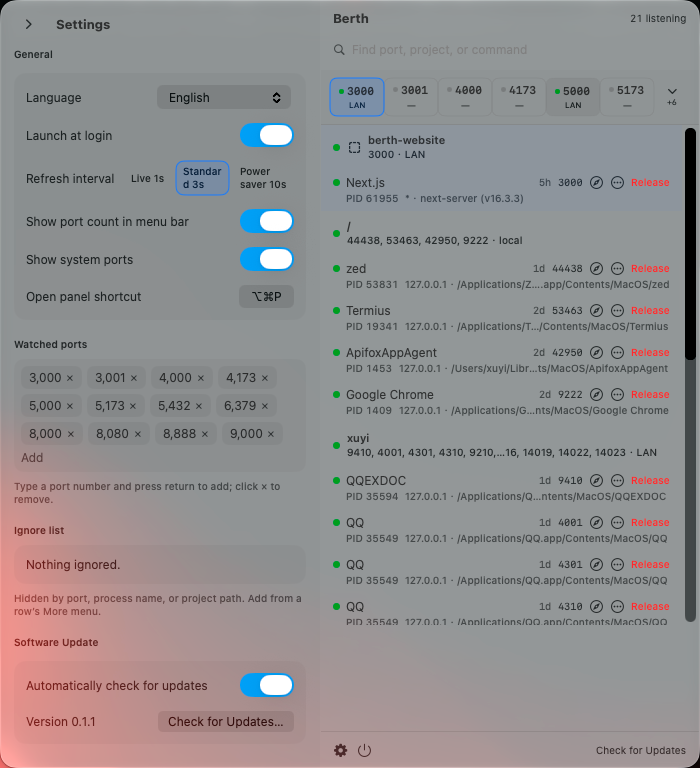
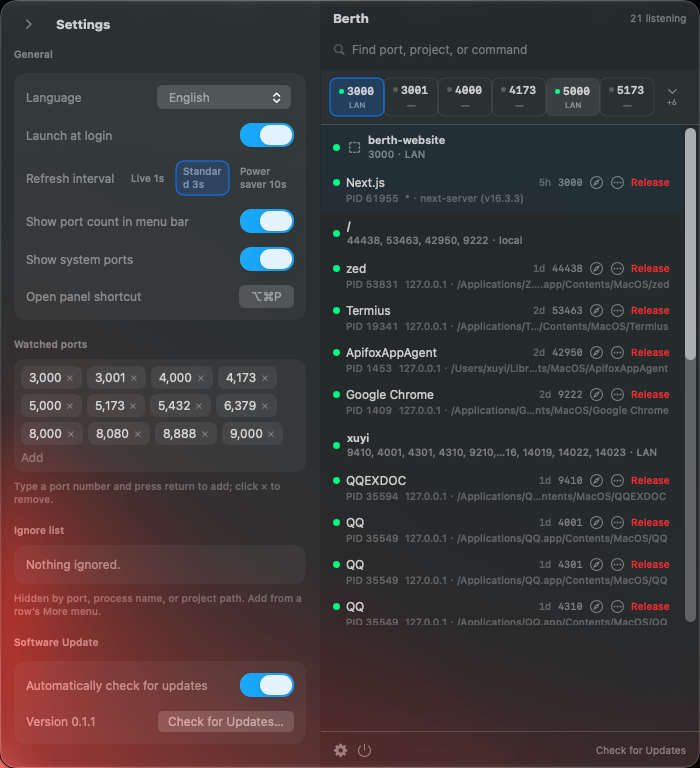
Small tool. Does the job.
Everything in one compact panel — no windows, no daemons, no dashboard to keep open.
Boring, on purpose.
A tool that can stop processes should earn your trust before it does anything clever. Berth keeps the surface small and the receipts public.
Read the sourceSigned and notarized
Every build is signed with a Developer ID certificate and scanned by Apple's notary service. The ticket is stapled to the app.
Updates you can verify
Updates are served over HTTPS and checked with EdDSA signatures by Sparkle before anything touches your Mac — then they install only when you click.
No telemetry, no accounts
Berth makes no network calls of its own. It reads your local ports and that is all. No analytics, no crash reporting, no sign-in.
Open source, Apache-2.0
The full source is on GitHub, including the release pipeline that signs, notarizes, and publishes every version.
Changelog
- Memory-growth fix in the CPU usage cache; smoother long sessions
- Extra guard against stopping a freshly swapped system process
- Faster process termination with event-driven command runner
- Cached panel rendering for instant search on busy machines
- Check for updates right from the panel and restart into the new version with one click
- Taller panel and settings layout — no scrolling in either language
- Automatic update downloads are always on, quietly in the background
- Watch and release development ports from a single menu bar panel
- Project cards with process, PID, and path details
- Berth grid for pinned ports with one-click release and force-kill
- English and Simplified Chinese, light and dark appearance
Frequently asked questions
What is Berth?
Berth is a free, open-source macOS menu bar app for developers. It shows which development ports (like 3000, 5173, 8080, 5432) are in use, groups them by project, and lets you release a port with one click instead of running lsof and kill commands.
How do I free port 3000 on a Mac?
Without a tool you would run lsof -nP -iTCP:3000 -sTCP:LISTEN to find the PID, then kill <PID>. Berth shows port 3000 in its menu bar panel with the owning project and process, and releases it in one click — with a confirmation before anything is stopped.
Is Berth free?
Yes. Berth is completely free and open source under the Apache-2.0 license. There is no paid tier, no account, and no telemetry.
Is Berth safe to install?
Every build is signed with a Developer ID certificate, notarized by Apple, and stapled. Updates are distributed over HTTPS and verified with EdDSA signatures by Sparkle before installation. The app itself makes no network requests.
Which macOS versions does Berth support?
Berth requires macOS 14 (Sonoma) or later and runs on Apple Silicon Macs.
Does Berth replace lsof?
Berth uses lsof under the hood but adds project grouping, framework detection, watched-port indicators, and one-click release. It replaces the manual lsof-plus-kill workflow, not the tool itself.

Give your ports a berth.
Free and open source. Requires macOS 14 or later, Apple Silicon.
Berth-0.1.1.dmg · notarized · ~4.4 MB